Tracking Script
The Tracking Script connects activity on your website with the demos your visitors view. It ties known visitors and campaign traits to demo activity, and can send demo events to your analytics tools even on pages without an embedded demo.
An Admin must create and configure tracking keys.
Create and install a key
- Open Settings > Integrations > Tracking Script.
- Give the key a name that identifies its website or app.
- Create the key, then choose Script tag or Google Tag Manager.
- Copy the generated snippet and install it across your website or app. For a script-tag installation, place it in the
<head>. In Google Tag Manager, use a Custom HTML tag that fires on all pages. - Use Seen on pages to confirm where HowdyGo has detected the script.
The hgk_ value in the snippet is a publishable browser key. Each key has its own tracking configuration, so you can use separate keys for different websites or environments.
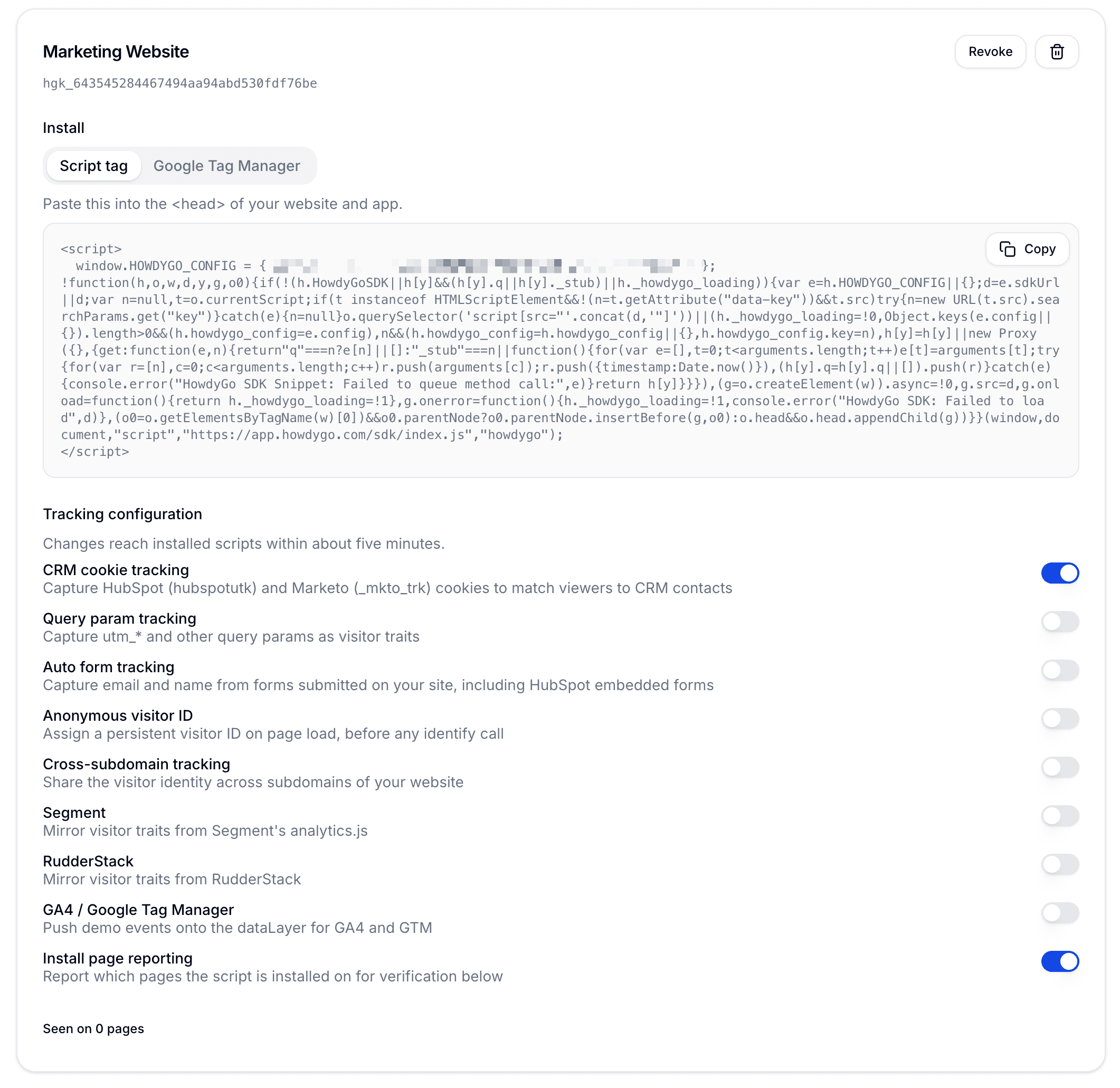
Configuration changes reach installed scripts within about five minutes.
A key is required for passive visitor tracking. The SDK’s manual methods, including identify(), personalize(), modal embeds, and player controls, still work without one.
Choose what the script tracks
Turn on the sources you want this key to collect:
| Setting | What it does |
|---|---|
| CRM cookie tracking | Reads HubSpot’s hubspotutk and Marketo’s _mkto_trk cookies so HowdyGo can match demo activity to CRM contacts. |
| Query param tracking | Captures utm_* and other query parameters as visitor traits, then keeps them as the visitor navigates a single-page app. |
| Auto form tracking | Captures identification fields such as email, name, phone, and company from submitted forms, including embedded HubSpot forms. It does not capture passwords or complete form contents. |
| Anonymous visitor ID | Assigns a persistent visitor ID before the visitor has been identified. |
| Cross-subdomain tracking | Shares visitor identity across subdomains of your website. |
| Segment | Mirrors visitor traits supplied through Segment’s analytics.js. |
| RudderStack | Mirrors visitor traits supplied through RudderStack. |
| GA4 / Google Tag Manager | Pushes HowdyGo demo events to dataLayer for GA4 and GTM. |
| Install page reporting | Reports which pages contain the script so you can verify the installation. HowdyGo removes query parameters from reported page URLs. |
Auto form tracking is limited to forms submitted to your own domain, HubSpot forms, and Marketo forms.
Account-based marketing
Account-based marketing (ABM) depends on knowing who engaged and what brought them to the demo. The Tracking Script can keep that context with each visitor:
- CRM cookie tracking to recognize known HubSpot or Marketo contacts.
- Query param tracking to retain campaign, source, and target-account parameters from the landing page.
- Auto form tracking to identify a visitor after they convert.
- Segment or RudderStack to attach company or account traits already available on your website.
After HowdyGo identifies the visitor, later demo activity stays tied to the same person and traits. Your CRM or analytics setup can then use those signals to spot target-account engagement and trigger the right follow-up.
The script tracks individual visitors rather than rolling several people into one account. Keep account-level reporting and buying-group analysis in your CRM or analytics platform.
Common uses
- Match a demo session on your marketing site to a known HubSpot or Marketo contact.
- Preserve campaign and company context for target-account demo engagement.
- Keep the same viewer identity as someone moves between your marketing site and app subdomains.
- Send demo engagement events to GA4 alongside the rest of your website funnel.
- Identify a visitor after they submit a form, then associate later demo activity with the same person.
For visitors you already know inside your app, you can also call identify() directly.
Privacy controls
Tracking settings work alongside your organization’s Data & privacy controls. If Disable viewer identification is enabled, HowdyGo does not store or process personally identifiable viewer data from the script. Anonymize viewer IP addresses applies to both demo analytics and Tracking Script analytics.
Every tracking method also respects setOptOut(true), which clears stored identity and stops further identity capture in that browser.
Revoke, restore, or delete a key
Revoke a key to pause its tracking configuration while keeping the option to restore it. Delete it only when you no longer need it.
If you replace a key, replace the old snippet wherever you installed it.